


500A IP68 Battery Monitor with LCD for 8–100V
The Sentorise 500A IP68 Battery Monitor gives you a clear, real-time view of your battery system without opening a compartment or guessing how much power is available.
Sale price
£104.00
Regular price
£123.00
(-15%)
Taxes included.
Shipping calculated at checkout.

500A IP68 Battery Monitor with LCD for 8–100V
Sale price
£104.00
Regular price
£123.00
(-15%)
See what’s happening inside your battery system
The Sentorise 500A IP68 Battery Monitor gives you a clear, real-time view of your battery system without opening a compartment or guessing how much power is available. Its fixed, backlit LCD display makes voltage, current, power and battery capacity easy to check at a glance, day or night.
Built for mobile and off-grid power
- 8–100V DC compatibility: Works with common 12V, 24V, 48V, 72V and 96V battery systems.
- 500A continuous current monitoring: Track demanding power systems with confidence.
- IP68-rated protection: Designed for dusty, wet and exposed installation environments.
- Panel-mounted LCD display: Keep essential battery information visible when batteries are installed out of reach.
- Configurable low-capacity alarm: Get an earlier warning when your battery system needs attention.
Made for real-world installations
A practical choice for RVs, camper vans, boats, off-grid solar systems, golf carts, forklifts and other mobile or backup power setups. Install it where you need a quick, dependable read on system performance, then get back to the journey, the job or the weekend.
- Product
- 500A IP68 Battery Monitor with LCD for 8–100V
- Dimensions
- 72.5 × 72.5 × 20.75mm
- Weight
- 0.588kg
Check the selected listing and supplied documentation for included components, terminal details, current limits, mounting orientation and operating conditions. Pack quantity does not change the specifications of an individual unit.
Request the manual or a specification confirmation for this model
Delivery options and applicable charges are calculated for your destination and selected items at checkout.
Read the shipping policy · Read the return and refund policy · Track an existing shipment
For a return or a product issue, contact support with your order number and model before sending goods back. Contact support
Warranty scope and conditions depend on the product and the applicable terms. Please read the Warranty Policy and keep your proof of purchase.
Warranty Policy · Submit product registration details · Ask about this product
Make the readings useful from day one
This overview does not replace the complete wiring diagram, including the monitor’s power/sense connection. Contact support for the correct instructions for your unit.


Frequently asked questions
Which systems and measurements does the monitor support?
The listed system range is 8–100V DC with current monitoring up to 500A. The display provides voltage, current, power and battery-capacity information. Confirm wiring and component ratings for your complete installation.
Do I need to set the battery capacity on first use?
Yes. Check the current reading, enter the battery’s effective capacity and follow the manual’s full-charge setup procedure before relying on the capacity and remaining-time readings.
Where does the shunt belong?
The model’s installation guidance places the shunt in the battery’s negative circuit: B− on the battery side and P− on the charger/load side. Follow the complete wiring diagram, including the power and sense connections.
Why might the state-of-charge reading look wrong?
Check the capacity setting and the full-charge setup. Also confirm that all charge and discharge current passes through the shunt; a bypass connection can prevent complete measurement.
Does this monitor replace the battery’s BMS or a charger?
No. It measures and displays system information. Continue to use the battery’s required protection and a compatible charger, with wiring and fusing appropriate to the system.
Where can I find the right manual or get help with compatibility?
Use this product’s specifications and documents section. If you need confirmation, contact support with the product model, your planned equipment and, for an existing unit, the serial number. Do not use another model’s instructions as a substitute.
Still have a question about this model?
This product has no reviews of its own. The merchant grouped it with related products, so the reviews shown are from across that group.
J
My boat is from the late 70's and I've been trying to modernize it in the best ways possible.
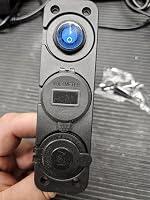
This charging port or cigarette lighter is exactly what I need in my boat. I can bring a phone charger with me and actually charge my phone while in fishing, not having to worry about my phone dying while in on the water. To me that's nice because I sometimes use my phone for marking fishing spots I like, or navigation instead of using the fish finder.
The other nice feature on this is the voltage meter. I can keep track of the trolling motor battery and know how much charge is left. Not knowing how my battery is doing kind of sucks otherwise.
This is a great way to update or modernize an old boat a little without ruining the charm of it being old. It's nice to have some modern features while you're out on the lake!
M
This quick disconnect kit is a great solution for anyone who connects and disconnects power from a battery. The connectors fit together securely while still being easy to separate when needed, making them ideal for vehicles, trailers, RVs, golf carts, and other 12V or 24V projects.
The contacts and housing feel well made, and the included mounting bracket and waterproof cover are nice additions that help keep everything protected and organized. The connectors accepted the recommended wire sizes without any issues, and once crimped, they provided a solid, dependable connection.
I also appreciate that everything needed for installation is included in the kit, making setup quick and straightforward.
Overall, this is a durable, high-quality battery quick disconnect kit that performs exactly as expected. It offers a secure electrical connection, quality components, and excellent value for the price. I’d definitely recommend it.

L
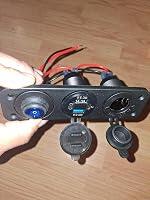
This worked well in my old farm truck and was an easy way to add modern power options without major modifications. Installation was straightforward and it has been reliable in daily use. It is a convenient upgrade for older vehicles that were built before USB charging became common. It feels durable and mounting was easy.
I use it to power my phone and a 12 volt DC fan, and it handles both without any issues. The ports fit securely and provide dependable power for basic accessories. It's decent value for the money. Overall it's a simple and practical addition that makes an older truck much more convenient to use.
c
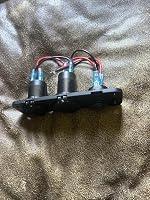
Works as it should and easy to install. It looks great and everything works as it should except the voltage meter. The meter was reading 12.4 when it was actually 12.2 confirmed but 3 other meters. This is such a small difference it is no big deal to me but it may be to some ppl. I could have gotten a defective one as well. It looks great installed on my boat and the ports are completely water tight with the covers installed. It’s rewired which makes instal quick and easy. I would recommend
A
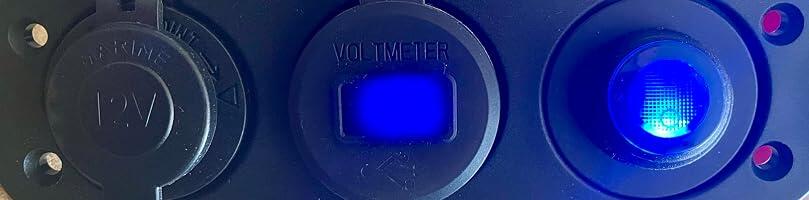
The SENTORISE 12V 3-in-1 socket is perfect for my needs. I wanted a way to power my devices using a 12V LiFePO4 system during emergencies so I could charge my cell phones, tablets, and other small electronics. This unit is well-made, and I love that I can turn everything off with a single toggle switch. It also features a voltmeter, allowing me to roughly tell how much life my battery has left. Plus, it offers plenty of different charging ports, including a cigarette lighter socket, USB-C, and USB-A.
L
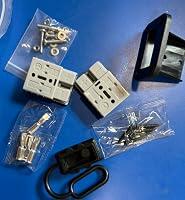
These quick connects the Anderson connector style up to 600 V 50 amp wire sizes anywhere anywhere between six and. I use this for making it so that my winch I can quickly connect it in or I can move it to a different vehicle and connect there.
A
These quick disconnect connectors feel reasonably well made overall and the terminals fit tightly in the housing without feeling loose or flimsy. The included mounting bracket is useful if you need a through-panel mounting solution for an RV, trailer, or equipment setup.
One thing I noticed immediately is there is no branding or marking on the connector housings themselves. That is not necessarily a problem, but it does make them feel a little more generic compared to name-brand style connectors.
It is also important to know before ordering that proper installation requires additional tools. The best option is a hydraulic crimper for the terminals, although soldering is possible if that is what you have available. This is not really a beginner plug-and-play wiring kit unless you already have the needed tools.
I do appreciate that one dust cover is included, but I really wish both halves of the connector had protective boots. In real-world outdoor use, both sides are likely to be exposed to dirt, moisture, and weather at different times. I also think the rear wire-entry side of the connector should ideally have sealing boots as well if being used outdoors.
Because of that, I would personally recommend these more for clean or protected environments unless additional boots or weather protection are added separately.
At the time of ordering, these still felt like a decent value, especially if you specifically need the mounting bracket setup and already have the proper crimping tools available.
H
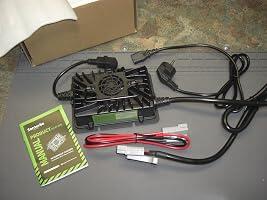
Starkes Ladegerät, daß ich für unser Wohnmobil nutze. Durch die automatische Erhaltungsladefunktion lasse ich dieses Ladegerät den Winter über am Motorrad angeschlossen.
Das beigelegte Anderson-Anschlußkabel ist nützlich, dieses habe ich über eine Sicherung fest mit meiner LiFePo4-Batterie verbunden. Der Netzteillüfter des Gerätes ist nicht störend.
Der mitgelieferte Schuko-Stecker ist für deutsche Steckdosen ausgelegt.
D
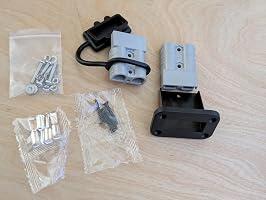
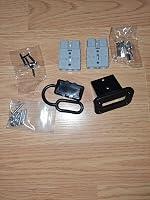
This Anderson-style 50A quick connect/disconnect plug kit offers a rugged and highly reliable solution for high-amperage electrical connections. The build quality of the grey housings is excellent, engineered to provide a secure, spark-free mechanical connection that locks firmly together and holds up well under constant use.
The electrical performance is highly versatile, making it an ideal choice for heavy-duty 24V setups like trolling motors, solar banks, or onboard charging circuits. Because the housings are rated for up to 600V, they would work perfectly for 48V configurations as well without any insulation concerns. The kit delivers great practical value by including good wiring terminals and robust mounting hardware, featuring a flush-mount bracket and a protective rubber cap to keep dust, moisture, and corrosion out of the contacts when uncoupled.
Overall, it is a top-tier piece of electrical hardware for anyone needing a clean, detachable power link. The combination of secure mounting provisions and heavy-duty current handling makes it a trustworthy choice for demanding marine, automotive, or off-grid power installations.
M
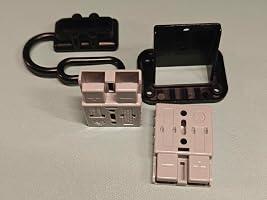
These provide reliable modular connection/disconnection for 600V battery systems.
It's better than soldered or welded connectors becauseits now a disconnect. Its ideal for truck, RV, and marine equipment.
The wire sizes are 6 down to 12 AWG
Its flame retardant & high conductivity
The PC housing is heat resistant, UL94 V-0 for lasting safety.
Its silver-plated pure copper terminals deliver high current carrying and it ensures stable voltage and current, and is resistant to abrasion and corrosion.
Its soft rubber cover seals out dust, rain, and splashes when not in use.
Temps -4°F to 221°F (-20°C to 105°C). Mounting bracket included for secure installation on RVs, weed cutters, or marine panels.
It includes 2 connectors, protective cover, bracket, 4 silver-plated terminals, mounting/fix screws, nuts, washers, spring washers.
Fits 6-12 AWG wire. For truck, forklift, RV, golf cart, marine, weed cutter, and solar battery systems.
It has a polarized locking plug (Asymmetrical) snap-lock design with clear polarity marks (+/-) allows insertion only in the correct direction.
Eliminates short circuits or equipment damage caused by reverse polarity. Perfect for DIY battery upgrades.

L
This is a good connector pair for the money. It’s rated for 50 amps but I only tested it running my winch at about 25–30 amps. At that level it worked fine with no heating or connection issues so it seems solid for typical 12V setups when used within its limits. The plastic mounting bracket is decent and feels more durable than you’d expect at this price. Installation is straightforward since the hardware is included, and everything lines up without much effort.
One important note is that you really need to use a good quality crimper on the connections. A proper crimp makes a big difference in reliability especially at higher currents. Also there’s no weatherproof cap for the bracket so I wouldn’t leave it exposed to constant rain unless you add protection.
J
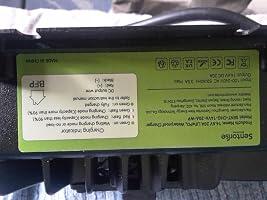
SENTORISE 20 A LiFePO4 Batterieladegerät, 12 V/12,8 V:
Die massive mechanische Verarbeitung macht einen überaus soliden und vertauenserweckenden Eindruck. Beim Ladetest mit einem 12,8V, 100Ah, LiFePo-Akku wurden 305 Watt gezogen. Das sind bei 14,6V Ladespannung etwa 20A Ladestrom (Eigenverbrauch abgezogen), was ziemlich genau den Angaben entspricht. Der Lüfter springt dabei an und macht ein moderates Lüftergeräusch, gut hörbar, aber nicht unangenehm.
In der Nähe der Ladeschlussspannung regelt der Lader die Leistung nach und nach ab und schaltet dann ganz ab wenn die End-Spannung erreicht ist.
Die batterieseitigen Ladekabel werden dabei ziemlich schnell warm. Leider gibt es nirgendwo Angaben über den Querschnitt der Kabel (vermutlich 4mm²) , der bei solchen höheren Strömen nicht unwichtig ist für die Verlustleistung. Auch sieht es so aus, als ob die Kabel nicht aus Kupfer sind , sondern nur aus Aluminium, das einen etwas höheren Widerstand hat. Damit kommt man bei 20A auf eine beträchtliche Verlustleistung von bis zu 10 Watt, die das Ladekabel aufheizt und dem Ladevorgang verlorengeht. Mit einem größer dimensionierten Kupferkabel würde nur ca. die Hälfte der Leistung verlorengehen. Gespart wurde hier am falschem Ende und das bei dem nicht kleinen Preis. Als Verbindung dienen robuste und zuverlässige Anderson-Stecker, aber leider nicht wassergeschützt ausgeführt, im Freien keinesfalls dauerhaft zu verwenden. Positiv hervorzuheben sind die umfangreichen Sicherheitsfunktionen einschließlich Verpolungsschutz. Dieser wurde unfreiwillig getestet und hat dabei einwandfrei funktioniert. Nichts ist passiert!
Fazit: Obwohl der Lader seinen Job sehr gut macht, gibt es einen Punkt Abzug wegen der unterdimensionierten Ladekabel, die der Qualität des Gerätes nicht gerecht werden.
M
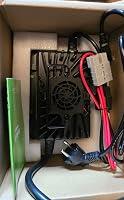
Ich wollte eigentlich nur ein einfaches Ladegerät für die LiFePO4-Batterie im kleinen Elektro-Truck meines Sohnes – angekommen ist dann dieses ziemlich massive Ladegerät. Schon beim Auspacken merkt man: Das ist kein Spielzeug, sondern eher für „ernsthafte“ Anwendungen gedacht.
Laut Produktseite handelt es sich um ein 20A LiFePO4 Ladegerät mit 12V/12,8V und Anderson-Anschluss – und genau so fühlt es sich auch an. Groß, schwer, mit aktivem Lüfter und insgesamt eher wie Werkstatt-Equipment als wie ein kleines Ladegerät für Kinderfahrzeuge.
Technisch funktioniert es einwandfrei. Die kleine Batterie meines Sohnes wird problemlos geladen, stabil und ohne Auffälligkeiten. Auch die Verarbeitung macht einen soliden Eindruck, das Gehäuse ist robust und durch den Lüfter offenbar auf Dauerbetrieb ausgelegt.
Aber genau da liegt auch der Punkt: Für kleine Batterien ist das Gerät schlicht überdimensioniert. Es ist groß, nimmt viel Platz ein und wirkt im Verhältnis zur Anwendung einfach „too much“. Man merkt schnell, dass es eher für größere Batterie-Bänke gedacht ist.
Ich kann mir das Ladegerät sehr gut im Einsatz bei Wohnwagen, Wohnmobilen oder größeren Offgrid-Systemen vorstellen – also überall dort, wo wirklich Kapazität dahintersteckt und die 20A auch sinnvoll genutzt werden. Für meinen ursprünglichen Zweck hätte es aber definitiv auch eine Nummer kleiner getan.
Fazit:
Technisch starkes und solides Ladegerät, aber für kleine Anwendungen wie Kinderfahrzeuge deutlich überdimensioniert. Perfekt für Wohnmobil- oder größere Batterie-Setups – für „den kleinen Truck vom Nachwuchs“ eher Kanonen auf Spatzen 😄
D
Versitile. You can rearrange the plugs or even use them without the mounting plate if that works better for your project.
j
Alles 🆗
J
Use to power my phone and gps speedo on my buggy. Beat the crap out of it, got rained on. Still going.
H
🔎 Kurzfazit
Das SENTORISE Ladegerät ist vor allem für größere LiFePO4-Akkus interessant, bei denen ein kleines Ladegerät einfach unnötig lange braucht. Die Bedienung ist angenehm unkompliziert und mit Anderson-Stecker sowie Ringanschlüssen hat man zwei sinnvolle Möglichkeiten für den Anschluss. Besonders praktisch finde ich die 0-V-Aktivierung für Akkus, deren Schutzsystem nach einer Tiefentladung abgeschaltet hat. Wichtig ist allerdings: Das Gerät ist speziell für 12,8-V-LiFePO4-Akkus gedacht und sollte nicht einfach für andere Batterietypen verwendet werden.
✅ Stärken
Schnelles Laden: Mit 20 A geht das Nachladen größerer LiFePO4-Akkus deutlich flotter als mit einfachen 5-A-Ladegeräten.
0-V-Aktivierung: Ein Akku, dessen Schutzschaltung nach einer Tiefentladung abgeschaltet hat, kann damit wieder aufgeweckt werden.
Anderson-Stecker praktisch: Gerade im Wohnmobil oder bei einer fest eingebauten Batterie ist eine schnelle Steckverbindung sehr angenehm.
Zusätzliche Ringanschlüsse: Wer das Ladegerät lieber fest an der Batterie anschließt, hat dafür ebenfalls die passende Möglichkeit.
Robustes Gehäuse: Das Ladegerät macht einen soliden Eindruck und ist gegen Staub und Spritzwasser geschützt.
Automatischer Ladevorgang: Man muss nicht ständig danebenstehen und den Ladevorgang überwachen.
Gut für größere LiFePO4-Akkus: Besonders bei Wohnmobil, Boot oder Solarspeicher spielt die höhere Ladeleistung ihre Stärke aus.
⚠️ Schwächen
Nur für den passenden Akkutyp: Das ist kein universelles Ladegerät für jede 12-V-Batterie. Vorher unbedingt prüfen, ob tatsächlich LiFePO4 verwendet wird.
20 A sind nicht für jeden kleinen Akku passend: Bei kleineren Batterien sollte man kontrollieren, welchen maximalen Ladestrom der Hersteller erlaubt.
Aktive Kühlung: Bei höherer Ladeleistung arbeitet ein Lüfter mit. In einer völlig ruhigen Umgebung ist das natürlich hörbar.
Eher funktional als kompakt: Für eine festere Installation oder die Garage passt es gut, als winziges Reiseladegerät ist es weniger gedacht.
💡 Tipps & Praxis-Tipps
Vor dem ersten Laden würde ich unbedingt auf dem Akku nachsehen, ob dort LiFePO4 beziehungsweise Lithium-Eisenphosphat angegeben ist und welcher maximale Ladestrom erlaubt wird.
Bei einem 100-Ah-Akku sind 20 A eine angenehme Größenordnung, weil man nicht einen halben Tag auf eine vollständige Ladung warten muss. Bei deutlich kleineren Akkus kann dagegen ein schwächeres Ladegerät sinnvoller sein.
Wer den Anderson-Anschluss regelmäßig nutzt, kann die passende Gegenverbindung dauerhaft an der Batterie lassen. Dann wird das Anschließen deutlich komfortabler.
Das Ladegerät trotz IP65 nicht irgendwo im Wasser liegen lassen. Der Schutz ist für Staub und Spritzwasser hilfreich, ersetzt aber keinen komplett trockenen und gut belüfteten Montageplatz.
Die 0-V-Funktion ist besonders interessant, wenn das BMS des Akkus nach starker Entladung abgeschaltet hat. Trotzdem würde ich anschließend prüfen, warum der Akku überhaupt so weit entladen wurde.
🏁 Urteil
Das SENTORISE Ladegerät passt gut zu größeren 12,8-V-LiFePO4-Akkus, wie sie häufig im Wohnmobil, Boot oder in kleineren Solaranlagen eingesetzt werden. Vor allem die 20 A Ladeleistung machen im Alltag einen deutlichen Unterschied, wenn regelmäßig größere Kapazitäten nachgeladen werden müssen.
Anderson-Stecker, Ringanschlüsse und die Möglichkeit, einen abgeschalteten Akku wieder zu aktivieren, machen das Gerät angenehm vielseitig. Man muss lediglich darauf achten, dass Batteriechemie und zulässiger Ladestrom wirklich passen.
Für einen passenden LiFePO4-Akku würde ich es wieder wählen, besonders wenn ein kleines Ladegerät bisher einfach zu langsam war.
⭐ Sterne-Empfehlung
⭐⭐⭐⭐☆ (4/5 Sternen)
Kräftiges und unkompliziertes LiFePO4-Ladegerät mit praktischer 0-V-Aktivierung und sinnvollen Anschlussmöglichkeiten. Kleine Abzüge gibt es für den hörbaren Lüfter und den recht spezialisierten Einsatzbereich – mit dem passenden Akku ist es aber eine überzeugende Lösung.
K
Sehr angenehmer Verkäufer. Super schnelle Lieferung.Der Artikel entspricht voll unseren Erwartungen. Kann ich gerne weiterempfehlen.
K
Sehr angenehmer Verkäufer. Super schnelle Lieferung.Der Artikel entspricht voll unseren Erwartungen. Kann ich gerne weiterempfehlen.
J
Super leiseläufer!!! Perfekt .
Need help choosing?
Find the right battery, charger or accessory for your setup.


